📝 How to Activate Mobile Data on Android & iPhone
Mobile data activate karna aaj kal sab ke liye zaroori hai, chahe aap social media use kar rahe ho, YouTube dekh rahe ho ya online classes attend kar rahe ho. Kabhi kabhi users ko mobile data activate karne mein problem hoti hai, lekin ye guide simple steps mein aapko help karegi.
🔹 1) Check Your SIM & Mobile Data Balance
-
Apka SIM active hona chahiye
-
Data bundle subscribe hona chahiye (Daily, Weekly, Monthly)
-
Balance check karein:
Examples:
-
Jazz: *111# dial karein
-
Zong: *310# dial karein
-
Telenor: *345#
-
Ufone: *124#
🔹 2) Activate Mobile Data on Android
Step 1: Settings → Connections/Network & Internet
Step 2: Mobile Data toggle ON karein
Step 3: Data roaming agar required ho to ON karein
Step 4: Preferred network type select karein (4G/3G/2G)
Tip: Agar data activate nahi ho raha to phone restart karein.
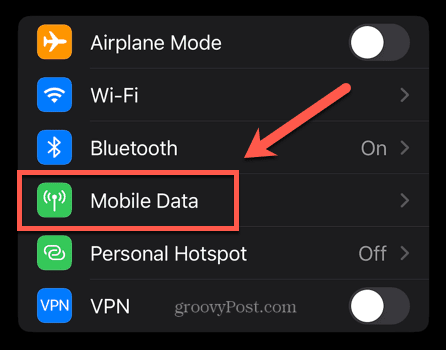
🔹 3) Activate Mobile Data on iPhone
Step 1: Settings → Cellular/Mobile Data
Step 2: Cellular Data toggle ON karein
Step 3: Data Options → Enable LTE (optional for faster speed)
Step 4: Roaming ON karein agar abroad ho
🔹 4) Check APN Settings (Important Step)
Kabhi kabhi mobile data activate nahi hota because APN settings incorrect hoti hain.
Steps:
-
Settings → Network & Internet → Mobile Network → Access Point Names
-
Apni network ki APN settings check karein:
-
Jazz APN: jazzinternet
-
Zong APN: zonginternet
-
Ufone APN: ufones
-
Telenor APN: internet
-
Tip: Agar incorrect ho, to APN manually update karein.
🔹 5) Restart Your Phone
-
Kabhi-kabhi simple restart se mobile data activate ho jata hai.
-
Phone ko 10–15 seconds ke liye off kar ke restart karein.
🔹 6) Extra Tips to Fix Mobile Data Issues
-
SIM card properly insert karein
-
Airplane mode 1 minute ON & OFF karein
-
Data saver OFF karein (Settings → Data Saver)
-
Network reset try karein (Settings → System → Reset Network Settings)
❓ FAQs
Q1: Agar data activate nahi ho raha to kya karen?
A: APN settings check karein, balance check karein aur phone restart karein.
Q2: Mobile data speed slow hai, kya karen?
A: Network type LTE/4G select karein aur background apps close karein.
Q3: Free internet trick kaam karega?
A: No, official bundles use karein for stable connection.
.jpg)